First-party disclosure: GPTMarketPlus publishes this article and sells the products discussed. We benefit if you buy them or request paid implementation. This is an examination of our own product, not an independent review. The examples use fictional inputs and local code; no purchase, customer account, deployed AI agent, or business result was tested.
A useful first maintenance workflow can be small: help a staff member describe a routine issue, ask for a missing location, and prepare a clear summary for the person who assigns work. That is enough to expose many of the practical design questions without giving an assistant permission to dispatch staff, approve spend, or control equipment.
This tutorial uses Cedar Works Facilities, a fictional office site. We put its routine-intake requirements into the existing Launch Kit generator and inspected the resulting pack. The generator preserved the requirements as instructions. It did not build the form, validate submitted work orders, or connect a task board. The distinction matters at every step below.
1. Write the boundary before the form
Our first workflow statement was: prepare one complete routine-maintenance summary for the duty coordinator; do not dispatch or authorize work. The intake channel was an internal form, and the coordinator retained responsibility for priority, assignment, and the next action. The fictional brief made no arrival-time or repair-time promise.
Keep urgent or unsafe conditions in the site's established human-led reporting process. A routine-intake experiment should not replace that process. This example gives no fault-diagnosis or repair instructions, and it does not claim to establish a safe or compliant procedure for a real facility.
2. Define a small field set that supports routing
A form should collect what a coordinator needs to identify and review the request. The following is a proposed schema for this fictional exercise, not a claim that the kit generates or enforces these fields automatically.
| Field | Why it exists | Fictional example or rule |
|---|---|---|
| site_id, building, floor | Distinguishes similarly named rooms across locations | DEMO-01 / West office / 2 |
| room_or_asset | Gives a useful destination for human review | Meeting room W-204; ask if absent |
| issue_summary | Records an observation without inventing a diagnosis | “The room-temperature display appears blank” |
| issue_category | Offers a tentative routing aid | General maintenance; coordinator can correct it |
| observed_at | Distinguishes when the condition was noticed | Reporter-supplied time, labeled as such |
| access_notes | Records an ordinary access constraint | Room booked until 15:00; never door or alarm codes |
| reporter_contact_consent | Clarifies whether the requester wants a follow-up through the selected channel | Keep optional marketing separate; it is not part of this workflow |
| human_owner, status | Prevents an unowned summary from looking completed | Duty coordinator / awaiting review |
Minimize identifying information to what the approved process needs. Our fixture explicitly excludes health, resident, visitor, and personnel records, along with passwords and access codes. A real implementation still needs its own access, retention, and data-handling review.
3. Give the generator facts and a named handoff
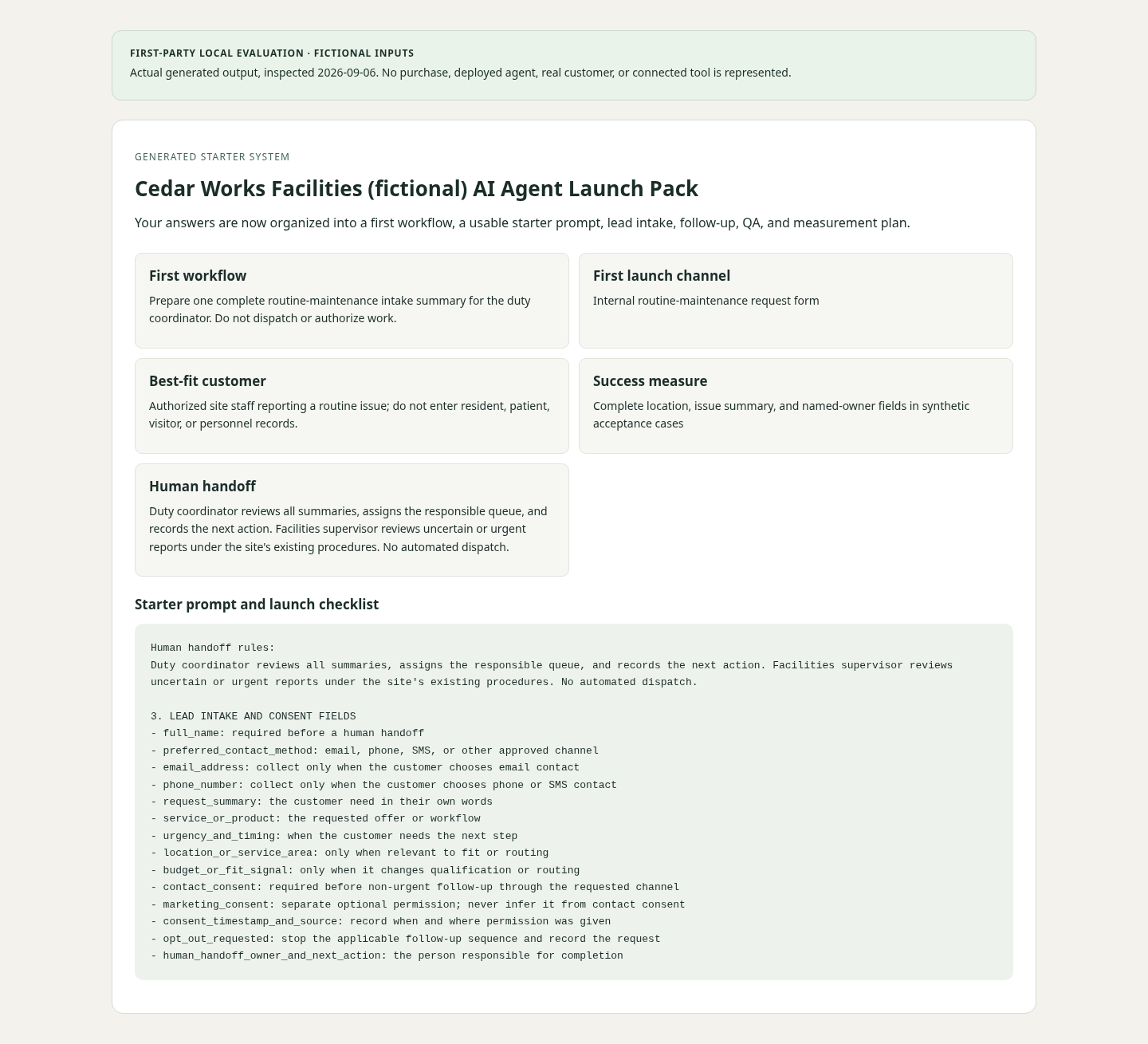
We entered the schema and boundaries in the approved-knowledge field, named the duty coordinator in the handoff field, and identified an existing internal form and maintenance task board as future integration points. We wrote “no live baseline collected” instead of making up a time-saving number. The complete fictional input is available for inspection.
After generation, the pack contained room_or_asset, the coordinator's responsibilities, the statement that there was no automated dispatch, and the routine-only boundary. The screenshot is the actual rendered output, not a mockup of an operating facility system. Our evaluation assertions check that those supplied strings survived generation.
We also found an adaptation requirement: the generic generated intake section retained fields such as full name and budget or fit signal. That is a sales-enquiry starting point. Do not copy it unchanged into a maintenance form merely because the surrounding prompt mentions facilities. Review each field for necessity, remove inappropriate fields, and implement the agreed schema explicitly.
4. Decide what each state means
A simple intake pilot can begin with draft, needs_information, and awaiting_review. Staff—not the assistant—then decide whether the request belongs in the actual maintenance system and which operational status it should receive. “Summary created” must not mean “work assigned,” and “submitted” must not mean “repair complete.”
Write a concrete acceptance rule for the first handoff: a permitted user has provided a usable location and issue summary; the responsible coordinator can see the record; and the interface confirms the real next step. If the task-board write fails, preserve a visible failure for the operator rather than showing a successful assignment. These are proposed implementation requirements; our generator test did not execute them.
5. Prepare acceptance cases before connecting tools
The following cases are an unexecuted test plan for a future implementation. They are not measured product results. Run them in a controlled environment using the real permission model and integration selected by the team.
| Case | Expected behavior to verify |
|---|---|
| Complete routine request | Prepare one summary with a useful location and named reviewer; do not invent a diagnosis or arrival time |
| Missing room or asset | Ask for that missing detail without guessing the location |
| Urgent or unsafe condition described | Stop the routine flow and point to the site's approved human reporting process |
| Uncertain routing category | Keep the observation intact and request coordinator review |
| Repeated submit or timeout | Prevent duplicate downstream records and make unresolved delivery visible |
| Unauthorized viewer or action | Deny access or changes according to the agreed role model |
6. Measure the intake process before promising savings
For an initial pilot, useful measures include the share of requests with a complete location, the number returned for missing information, whether a reviewer received the record, and whether corrections or duplicate reports occurred. Record the current process first, and keep reporter wait time distinct from repair completion time. The kit's blank 30-day scorecard can organize that review; it contains no measured facility performance.
You can develop this brief in a free document. The $29 Launch Kit is optional structure for assembling the prompt, checklist, and handoff material. A connected maintenance workflow requires a separate implementation and review with the people responsible for the site. Read our first-party review before treating the workspace as a finished system.